Reading the screener — how to pick undervalued candidates
Last updated: 2026-08-29
The home page displays screening results updated daily. Multiple tabs appear here, each with a specific meaning. This guide explains what they show and how to read them.
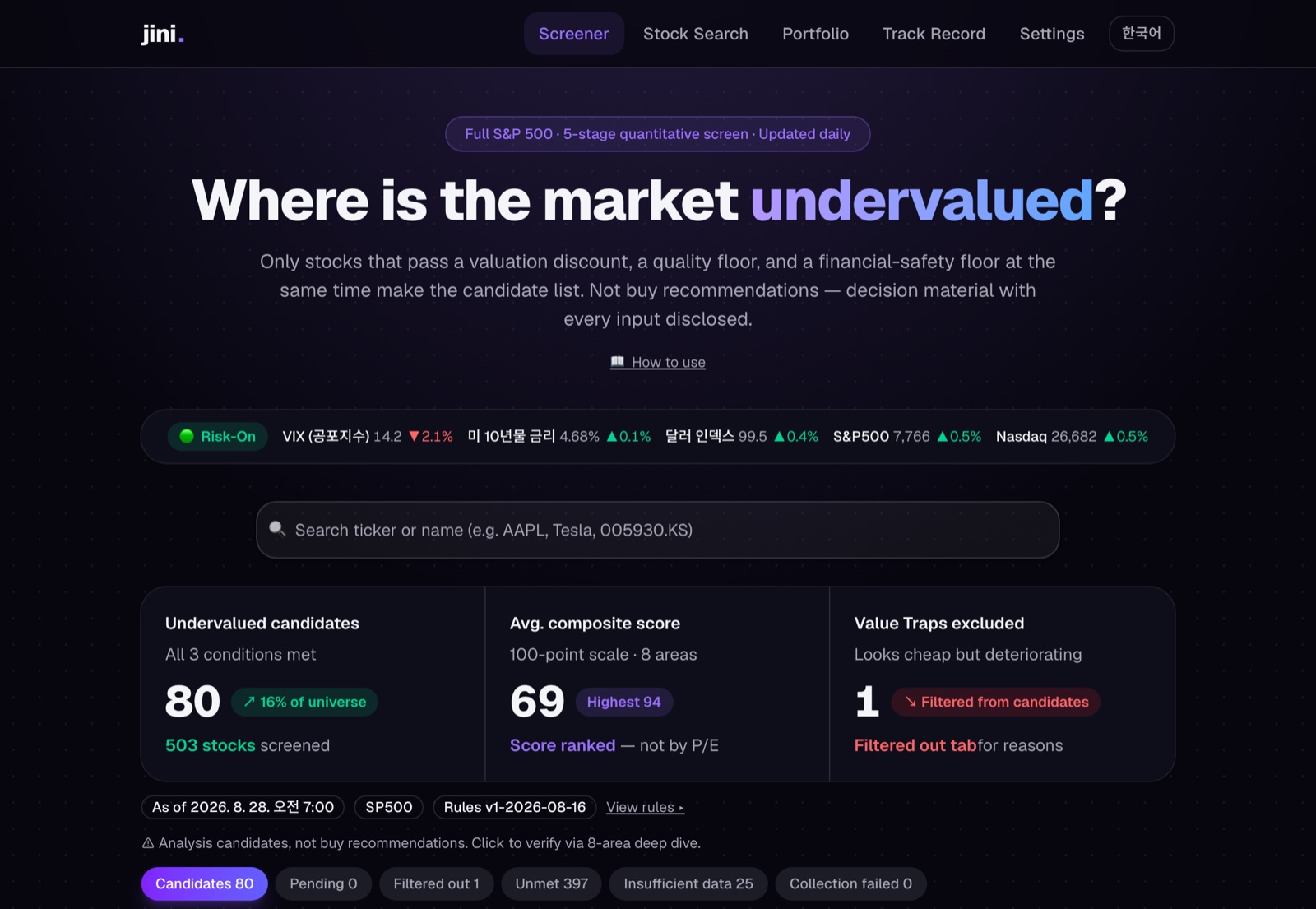 The actual home screen — candidate summary and tabs (Candidates / Verifying / Excluded / Not qualified)
Candidates tab — three conditions met simultaneously
Stocks in the candidates tab have not met one condition — they have met three at the same time:
- Discount (price) — Multiple valuation methods (P/E, P/B, P/S, DCF) suggest fair value above the current price.
- Quality (business) — Profitability (ROE, ROIC) and earnings quality are strong.
- Financial safety — Debt is manageable and cash flow is healthy.
The candidates tab is not sorted by low P/E. The sort is by composite score, a single strength number combining all three conditions. This matters because cheap is not always good. Cheap stocks exist for reasons. The screener's principle is not to buy every cheap stock, but only cheap stocks where the business is strong and finances are sound.
Click any candidate to go to its detail page, where individual analysis begins.
Verifying tab — not yet a candidate
The verifying tab shows first-pass previews. These stocks have passed some filters (price or quality, say), but not all three conditions simultaneously, so they are not yet promoted to candidates. It means "if conditions hold through tomorrow, this might become a candidate."
As financial data refreshes or prices move, tomorrow it might climb to candidates or drop to excluded. Today, it is just on your watchlist.
Excluded tab — cheap-looking but deteriorating (Value Trap)
The most important tab. Excluded stocks look cheap but have problems. Low P/E with falling price, or declining profitability. These are "value traps" — they appear undervalued but will likely keep falling.
When jini's AI analysis flags Type D (Declining Value Trap) or Type E (Cyclical Trap) with high confidence, the stock is automatically demoted to excluded and never reaches candidates.
Check the "reason" for each excluded stock to see why: "earnings declining", "debt rising", and so on.
Not qualified / Insufficient data tabs — conditions unmet or data missing
- Not qualified: Data is sufficient, but the stock fails the criteria. Quality is weak, or price is high, or debt is too much. Wait for conditions to improve.
- Insufficient data: Yahoo Finance lacks needed financials, or the company went public too recently to have enough history. It is marked honestly as "data insufficient".
At a glance — checking the rules
Above each tab is a "View rules ▸" button. Click it to see every filter applied (discount: P/E < X, quality: ROIC > Y, etc.). If the thresholds feel too strict or too loose, adjust them in the code (config/screener/).
Clearing a common misunderstanding
"Candidates are undervalued stocks, so I should buy them." This is wrong.
"Candidates are worth analyzing." This is right.
When you click a candidate and open its stock page, far more detail appears:
- 8-area breakdown — which areas excel, which are weak
- Fair value — conservative, base, and optimistic range
- AI analysis — what type of undervaluation (A–E) this is, how long it might last
- Final verdict and confidence — Strong Undervalued through Significantly Overvalued
The candidates tab is an entry point; the decision happens on the stock page.
Market sentiment strip (Risk-On/Off)
Below the search bar on the home page, VIX, rates, dollar, S&P 500, and a Risk-On / Neutral / Risk-Off badge appear. This is context only. It does not change the stock verdicts, scores, or fair-value calculations.
For example, a Risk-Off signal may appear, but candidates remain undervalued. Short-term market fear does not change the valuation verdict.
Checking the date
If data is more than 24 hours old, "old data" appears as a warning. Wait for the next screening run (home refreshes daily).
Found a candidate? The next step is stock page verification.